搜索到
13
篇与
shell
的结果
-
 iptables管理脚本 #!/bin/sh # # iptablesStart iptables firewall # # chkconfig: 2345 08 92 # description:Starts, stops and saves iptables firewall # # config: /etc/sysconfig/iptables # config: /etc/sysconfig/iptables-config # ### BEGIN INIT INFO # Provides: iptables # Required-Start: # Required-Stop: # Default-Start: 2 3 4 5 # Default-Stop: 0 1 6 # Short-Description: start and stop iptables firewall # Description: Start, stop and save iptables firewall ### END INIT INFO # Source function library. . /etc/init.d/functions IPTABLES=iptables IPTABLES_DATA=/etc/sysconfig/$IPTABLES IPTABLES_FALLBACK_DATA=${IPTABLES_DATA}.fallback IPTABLES_CONFIG=/etc/sysconfig/${IPTABLES}-config IPV=${IPTABLES%tables} # ip for ipv4 | ip6 for ipv6 [ "$IPV" = "ip" ] && _IPV="ipv4" || _IPV="ipv6" PROC_IPTABLES_NAMES=/proc/net/${IPV}_tables_names VAR_SUBSYS_IPTABLES=/var/lock/subsys/$IPTABLES # only usable for root if [ $EUID != 0 ]; then echo -n $"${IPTABLES}: Only usable by root."; warning; echo exit 4 fi if [ ! -x /sbin/$IPTABLES ]; then echo -n $"${IPTABLES}: /sbin/$IPTABLES does not exist."; warning; echo exit 5 fi # Old or new modutils /sbin/modprobe --version 2>&1 | grep -q module-init-tools \ && NEW_MODUTILS=1 \ || NEW_MODUTILS=0 # Default firewall configuration: IPTABLES_MODULES="" IPTABLES_MODULES_UNLOAD="yes" IPTABLES_SAVE_ON_STOP="no" IPTABLES_SAVE_ON_RESTART="no" IPTABLES_SAVE_COUNTER="no" IPTABLES_STATUS_NUMERIC="yes" IPTABLES_STATUS_VERBOSE="no" IPTABLES_STATUS_LINENUMBERS="yes" IPTABLES_SYSCTL_LOAD_LIST="" # Load firewall configuration. [ -f "$IPTABLES_CONFIG" ] && . "$IPTABLES_CONFIG" # Netfilter modules NF_MODULES=($(lsmod | awk "/^${IPV}table_/ {print \$1}") ${IPV}_tables) NF_MODULES_COMMON=(x_tables nf_nat nf_conntrack) # Used by netfilter v4 and v6 # Get active tables NF_TABLES=$(cat "$PROC_IPTABLES_NAMES" 2>/dev/null) rmmod_r() { # Unload module with all referring modules. # At first all referring modules will be unloaded, then the module itself. local mod=$1 local ret=0 local ref= # Get referring modules. # New modutils have another output format. [ $NEW_MODUTILS = 1 ] \ && ref=$(lsmod | awk "/^${mod}/ { print \$4; }" | tr ',' ' ') \ || ref=$(lsmod | grep ^${mod} | cut -d "[" -s -f 2 | cut -d "]" -s -f 1) # recursive call for all referring modules for i in $ref; do rmmod_r $i let ret+=$?; done # Unload module. # The extra test is for 2.6: The module might have autocleaned, # after all referring modules are unloaded. if grep -q "^${mod}" /proc/modules ; then modprobe -r $mod > /dev/null 2>&1 res=$? [ $res -eq 0 ] || echo -n " $mod" let ret+=$res; fi return $ret } flush_n_delete() { # Flush firewall rules and delete chains. [ ! -e "$PROC_IPTABLES_NAMES" ] && return 0 # Check if firewall is configured (has tables) [ -z "$NF_TABLES" ] && return 1 echo -n $"${IPTABLES}: Flushing firewall rules: " ret=0 # For all tables for i in $NF_TABLES; do # Flush firewall rules. $IPTABLES -t $i -F; let ret+=$?; # Delete firewall chains. $IPTABLES -t $i -X; let ret+=$?; # Set counter to zero. $IPTABLES -t $i -Z; let ret+=$?; done [ $ret -eq 0 ] && success || failure echo return $ret } set_policy() { # Set policy for configured tables. policy=$1 # Check if iptable module is loaded [ ! -e "$PROC_IPTABLES_NAMES" ] && return 0 # Check if firewall is configured (has tables) tables=$(cat "$PROC_IPTABLES_NAMES" 2>/dev/null) [ -z "$tables" ] && return 1 echo -n $"${IPTABLES}: Setting chains to policy $policy: " ret=0 for i in $tables; do echo -n "$i " case "$i" in raw) $IPTABLES -t raw -P PREROUTING $policy \ && $IPTABLES -t raw -P OUTPUT $policy \ || let ret+=1 ;; filter) $IPTABLES -t filter -P INPUT $policy \ && $IPTABLES -t filter -P OUTPUT $policy \ && $IPTABLES -t filter -P FORWARD $policy \ || let ret+=1 ;; nat) $IPTABLES -t nat -P PREROUTING $policy \ && $IPTABLES -t nat -P POSTROUTING $policy \ && $IPTABLES -t nat -P OUTPUT $policy \ || let ret+=1 ;; mangle) $IPTABLES -t mangle -P PREROUTING $policy \ && $IPTABLES -t mangle -P POSTROUTING $policy \ && $IPTABLES -t mangle -P INPUT $policy \ && $IPTABLES -t mangle -P OUTPUT $policy \ && $IPTABLES -t mangle -P FORWARD $policy \ || let ret+=1 ;; *) let ret+=1 ;; esac done [ $ret -eq 0 ] && success || failure echo return $ret } load_sysctl() { # load matched sysctl values if [ -n "$IPTABLES_SYSCTL_LOAD_LIST" ]; then echo -n $"Loading sysctl settings: " ret=0 for item in $IPTABLES_SYSCTL_LOAD_LIST; do fgrep $item /etc/sysctl.conf | sysctl -p - >/dev/null let ret+=$?; done [ $ret -eq 0 ] && success || failure echo fi return $ret } start() { # Do not start if there is no config file. if [ ! -f "$IPTABLES_DATA" ]; then echo -n $"${IPTABLES}: No config file."; warning; echo return 6 fi # check if ipv6 module load is deactivated if [ "${_IPV}" = "ipv6" ] \ && grep -qIsE "^install[[:space:]]+${_IPV}[[:space:]]+/bin/(true|false)" /etc/modprobe.conf /etc/modprobe.d/* ; then echo $"${IPTABLES}: ${_IPV} is disabled." return 150 fi echo -n $"${IPTABLES}: Applying firewall rules: " OPT= [ "x$IPTABLES_SAVE_COUNTER" = "xyes" ] && OPT="-c" $IPTABLES-restore $OPT $IPTABLES_DATA if [ $? -eq 0 ]; then success; echo else failure; echo; if [ -f "$IPTABLES_FALLBACK_DATA" ]; then echo -n $"${IPTABLES}: Applying firewall fallback rules: " $IPTABLES-restore $OPT $IPTABLES_FALLBACK_DATA if [ $? -eq 0 ]; then success; echo else failure; echo; return 1 fi else return 1 fi fi # Load additional modules (helpers) if [ -n "$IPTABLES_MODULES" ]; then echo -n $"${IPTABLES}: Loading additional modules: " ret=0 for mod in $IPTABLES_MODULES; do echo -n "$mod " modprobe $mod > /dev/null 2>&1 let ret+=$?; done [ $ret -eq 0 ] && success || failure echo fi # Load sysctl settings load_sysctl touch $VAR_SUBSYS_IPTABLES return $ret } stop() { # Do not stop if iptables module is not loaded. [ ! -e "$PROC_IPTABLES_NAMES" ] && return 0 # Set default chain policy to ACCEPT, in order to not break shutdown # on systems where the default policy is DROP and root device is # network-based (i.e.: iSCSI, NFS) set_policy ACCEPT # And then, flush the rules and delete chains flush_n_delete if [ "x$IPTABLES_MODULES_UNLOAD" = "xyes" ]; then echo -n $"${IPTABLES}: Unloading modules: " ret=0 for mod in ${NF_MODULES[*]}; do rmmod_r $mod let ret+=$?; done # try to unload remaining netfilter modules used by ipv4 and ipv6 # netfilter for mod in ${NF_MODULES_COMMON[*]}; do rmmod_r $mod >/dev/null done [ $ret -eq 0 ] && success || failure echo fi rm -f $VAR_SUBSYS_IPTABLES return $ret } save() { # Check if iptable module is loaded if [ ! -e "$PROC_IPTABLES_NAMES" ]; then echo -n $"${IPTABLES}: Nothing to save."; warning; echo return 0 fi # Check if firewall is configured (has tables) if [ -z "$NF_TABLES" ]; then echo -n $"${IPTABLES}: Nothing to save."; warning; echo return 6 fi echo -n $"${IPTABLES}: Saving firewall rules to $IPTABLES_DATA: " OPT= [ "x$IPTABLES_SAVE_COUNTER" = "xyes" ] && OPT="-c" ret=0 TMP_FILE=$(/bin/mktemp -q $IPTABLES_DATA.XXXXXX) \ && chmod 600 "$TMP_FILE" \ && $IPTABLES-save $OPT > $TMP_FILE 2>/dev/null \ && size=$(stat -c '%s' $TMP_FILE) && [ $size -gt 0 ] \ || ret=1 if [ $ret -eq 0 ]; then if [ -e $IPTABLES_DATA ]; then cp -f $IPTABLES_DATA $IPTABLES_DATA.save \ && chmod 600 $IPTABLES_DATA.save \ && restorecon $IPTABLES_DATA.save \ || ret=1 fi if [ $ret -eq 0 ]; then mv -f $TMP_FILE $IPTABLES_DATA \ && chmod 600 $IPTABLES_DATA \ && restorecon $IPTABLES_DATA \ || ret=1 fi fi rm -f $TMP_FILE [ $ret -eq 0 ] && success || failure echo return $ret } status() { if [ ! -f "$VAR_SUBSYS_IPTABLES" -a -z "$NF_TABLES" ]; then echo $"${IPTABLES}: Firewall is not running." return 3 fi # Do not print status if lockfile is missing and iptables modules are not # loaded. # Check if iptable modules are loaded if [ ! -e "$PROC_IPTABLES_NAMES" ]; then echo $"${IPTABLES}: Firewall modules are not loaded." return 3 fi # Check if firewall is configured (has tables) if [ -z "$NF_TABLES" ]; then echo $"${IPTABLES}: Firewall is not configured. " return 3 fi NUM= [ "x$IPTABLES_STATUS_NUMERIC" = "xyes" ] && NUM="-n" VERBOSE= [ "x$IPTABLES_STATUS_VERBOSE" = "xyes" ] && VERBOSE="--verbose" COUNT= [ "x$IPTABLES_STATUS_LINENUMBERS" = "xyes" ] && COUNT="--line-numbers" for table in $NF_TABLES; do echo $"Table: $table" $IPTABLES -t $table --list $NUM $VERBOSE $COUNT && echo done return 0 } reload() { # Do not reload if there is no config file. if [ ! -f "$IPTABLES_DATA" ]; then echo -n $"${IPTABLES}: No config file."; warning; echo return 6 fi # check if ipv6 module load is deactivated if [ "${_IPV}" = "ipv6" ] \ && grep -qIsE "^install[[:space:]]+${_IPV}[[:space:]]+/bin/(true|false)" /etc/modprobe.conf /etc/modprobe.d/* ; then echo $"${IPTABLES}: ${_IPV} is disabled." return 150 fi echo -n $"${IPTABLES}: Trying to reload firewall rules: " OPT= [ "x$IPTABLES_SAVE_COUNTER" = "xyes" ] && OPT="-c" $IPTABLES-restore $OPT $IPTABLES_DATA if [ $? -eq 0 ]; then success; echo else failure; echo; echo "Firewall rules are not changed."; return 1 fi # Load additional modules (helpers) if [ -n "$IPTABLES_MODULES" ]; then echo -n $"${IPTABLES}: Loading additional modules: " ret=0 for mod in $IPTABLES_MODULES; do echo -n "$mod " modprobe $mod > /dev/null 2>&1 let ret+=$?; done [ $ret -eq 0 ] && success || failure echo fi # Load sysctl settings load_sysctl return $ret } restart() { [ "x$IPTABLES_SAVE_ON_RESTART" = "xyes" ] && save stop start } case "$1" in start) [ -f "$VAR_SUBSYS_IPTABLES" ] && exit 0 start RETVAL=$? ;; stop) [ "x$IPTABLES_SAVE_ON_STOP" = "xyes" ] && save stop RETVAL=$? ;; restart|force-reload) restart RETVAL=$? ;; reload) [ -e "$VAR_SUBSYS_IPTABLES" ] && reload RETVAL=$? ;; condrestart|try-restart) [ ! -e "$VAR_SUBSYS_IPTABLES" ] && exit 0 restart RETVAL=$? ;; status) status RETVAL=$? ;; panic) set_policy DROP RETVAL=$? ;; save) save RETVAL=$? ;; *) echo $"Usage: ${IPTABLES} {start|stop|reload|restart|condrestart|status|panic|save}" RETVAL=2 ;; esac exit $RETVAL
 -
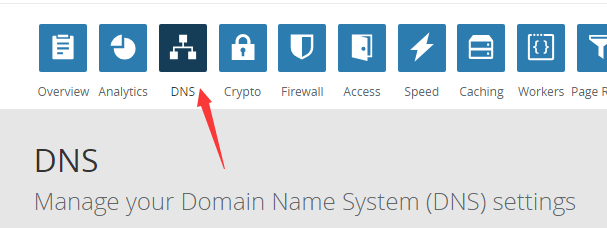
基于CloudFlare API的纯Shell动态DNS(DDNS)脚本 家庭宽带的IP是不固定的,当出门在外,人不在家时,一旦IP变动,就给接入家中的设备(如监控)带来许多麻烦,于是我编写了一个能在Linux系统下运行,基于cloudflare API的动态DNS脚本,虽然国内已有花生壳之类的ddns服务,但是那些实在是太坑爹,比如只能使用它提供的二级域名,而该脚本能够配置顶级域名的动态DNS解析。使用前提:局域网内有Linux主机(如openwrt路由设备)、有一个顶级域名、域名解析必须由CloudFlare托管。使用方法:步骤一:到CloudFlare官网注册一个帐号,找到DNS选项,如下图箭头指向,根据其要求,到你的域名注册商处将DNS服务器修改为CloudFlare提供的地址,修改完验证成功后就可以开始解析了。步骤三:获取三个Key值,其中APIKey和ZoneID可在官网登录后的Overview页面获得,而DNSID获取较为复杂,具体命令如下(需要安装curl):curl -X GET "https://api.cloudflare.com/client/v4/zones/输入你的ZoneID/dns_records?type=A&name=刚才设置的记录值(比如xxx.yourdomain.com)" \ -H "X-Auth-Email:你注册时的邮箱" \ -H "X-Auth-Key:你的APIKEY" \ -H "Content-Type: application/json"运行该命令后会输出结果,找到"id":"xxx"这个选项,其中的xxx即对应你的DNSID值下方为shell脚本(需要设备安装curl),配置好后可利用crontab命令定时执行,(1-2分钟执行一次最佳)具体操作如下:crontab -e */2 * * * * 脚本存放目录cfddns.sh#!/bin/sh CF_API_KEY=输入你的APIKEY CF_ZONE_ID=输入你的ZONEID CF_DNS_ID=输入你的解析记录值对应的DNSID EMAIL=输入你注册时的邮箱 ROUTER_NETWORK_DEVICE=你的设备拨号的网卡,openwrt一般是pppoe,可使用ifconfig命令查看 TEMP_FILE_PATH=/tmp/cloudflare-ddns/DNS_RECORD=填写用于ddns的DNS记录,要完整填写,比如:xxx.yourdomain.com mkdir -p ${TEMP_FILE_PATH}curl -k -X GET "https://api.cloudflare.com/client/v4/zones/${CF_ZONE_ID}/dns_records/${CF_DNS_ID}" \ -H "X-Auth-Email:${EMAIL}" \ -H "X-Auth-Key:${CF_API_KEY}" \ -H "Content-Type: application/json" |awk -F '"' '{print $26}'>${TEMP_FILE_PATH}/current_resolving.txt ifconfig $ROUTER_NETWORK_DEVICE | awk -F'[ ]+|:' '/inet /{print $4}'>${TEMP_FILE_PATH}/current_ip.txt if [ "$(cat ${TEMP_FILE_PATH}/current_ip.txt)" == "$(cat ${TEMP_FILE_PATH}/current_resolving.txt)" ]; then exit 1 else CURRENT_IP="$(cat ${TEMP_FILE_PATH}/current_ip.txt)" curl -k -X PUT "https://api.cloudflare.com/client/v4/zones/${CF_ZONE_ID}/dns_records/${CF_DNS_ID}" \ -H "X-Auth-Email:${EMAIL}" \ -H "X-Auth-Key:${CF_API_KEY}" \ -H "Content-Type: application/json" \ --data '{"type":"A","name":"'$DNS_RECORD'","content":"'$CURRENT_IP'","ttl":1,"proxied":false}' fi
-